

Student Eligibility Rules
 Please note: this webpage is intended for learning purposes only and is designed to demonstrate Workday functionality. It does not represent UMD’s final decisions or plans for using Student Eligibility Rules functionality.
This concept page describes Student Eligibility Rules in Workday Student.
Student Eligibility Rules use data about a student to determine if they meet certain criteria within Workday.
An eligibility rule can be compared to a lock. A student must meet certain criteria in the system to ‘unlock’ and receive access to a task, such as registering for a course with pre- and corequisites.
 Please note: In some scenarios, a department or college reviewer may approve an eligibility override for a student.
Common examples of how eligibility rules are used include:
- Creating course and course section prerequisites* or adding reserved seating
- Creating registration appointments for enrolling in course sections
- Creating academic requirements
Reserved Seating

Reserved Seating holds seats for identified groups of students in a course section. Reserved seats can be used for specific populations, such as students in a particular program of study. A student may meet the pre- and corequisites of the course, but if there are only reserved seats available, they must
also meet those eligibility rules. Reserved seats have the option of being reserved until a specific date, after which they can be released to any student who meets the requirements for the course.
Registration Appointments
 In Workday, all students must have a Registration Appointment to register. Registration appointments are determined by eligibility rules. For example, Claudette might have a registration appointment on Monday morning, while Ammar might not be scheduled to register until Friday morning. Claudette meets eligibility rules for an earlier registration appointment that Ammar does not meet.
Academic Requirements
Academic Requirements are rules that students must meet to successfully complete their degree objectives, such as General Education requirements and major requirements. Academic requirements can be created around certain criteria including:
- Courses: Number of courses required

- Credits: Number of credits required
- Grade Point Average (GPA): Minimum required
- Residency: Courses taken at UMD
Academic requirements act as validations of the coursework and non-course requirements of enrolled students and use Student Eligibility Rules to define the requirement.
Eligibility Rule Types
An Eligibility Rule Type is selected at the start of creating an eligibility rule. This will determine which delivered fields will display on the following page.
Common examples of eligibility rule types for Curriculum Management include:
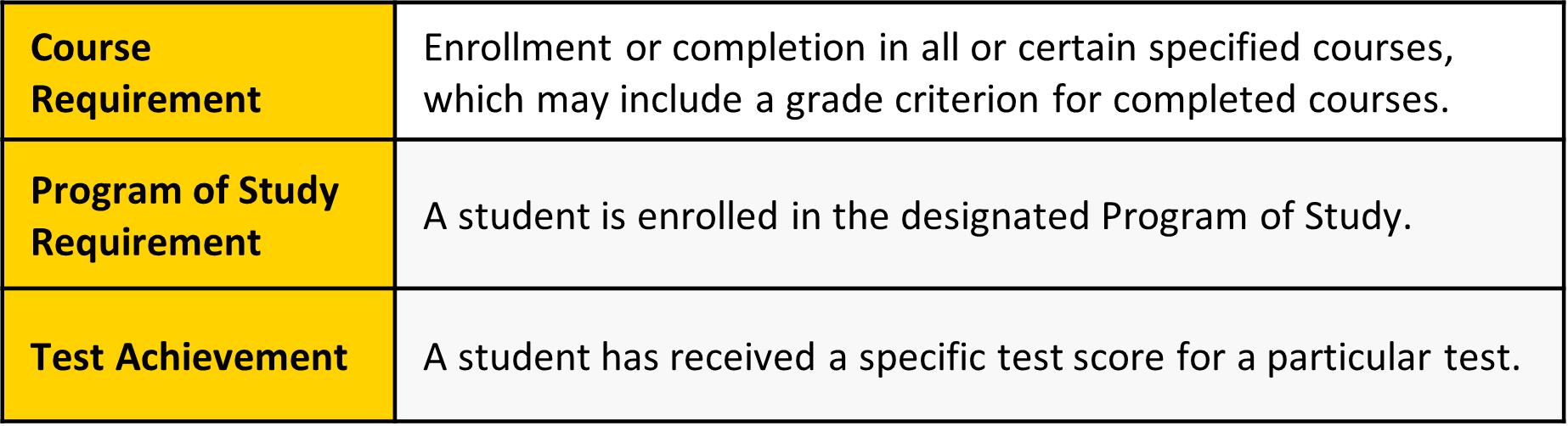
Examples of eligibility rule types for Academic Planning and Advising Tools include:
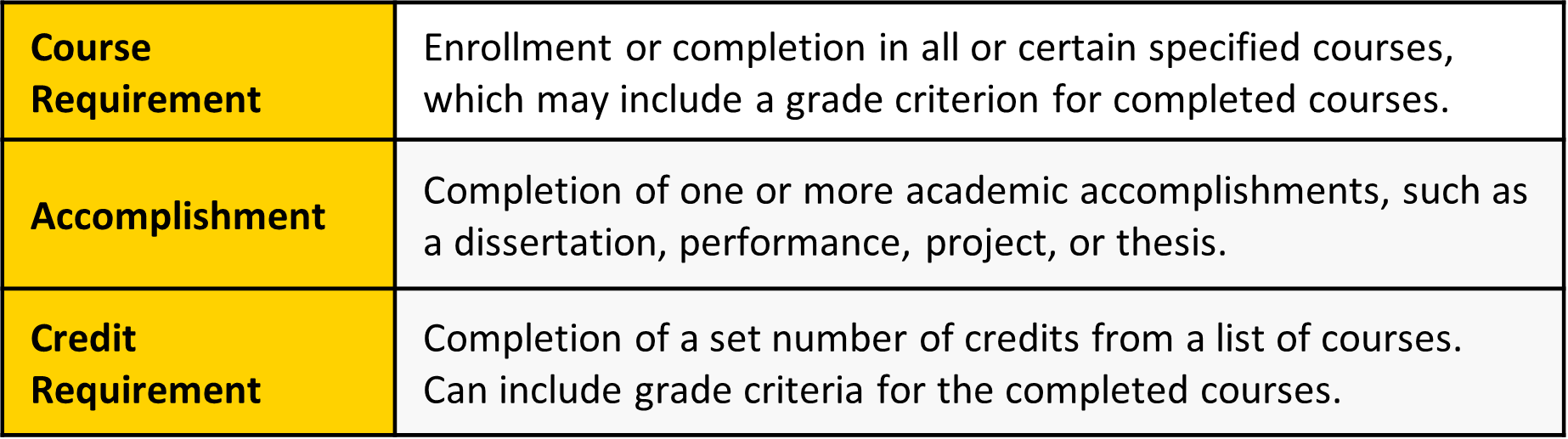
If an eligibility rule does not meet the specific scenario requirements, a student system administrator can instead configure a student condition rule to achieve the desired outcome. Course prerequisites, reserved seating rules, and registration appointments may use student condition rules for the following scenarios:
- Academic Level
- Exclusion Criteria; e.g., not in a specific program or college
- Latest Academic Standing
- Latest Class Standing
In each of these cases, the student condition rule is targeting a specific attribute on the student’s academic record or a point in time element (e.g., latest) that requires AND/OR logic to identify the criteria. In comparison, eligibility rules use delivered logic that is predefined by eligibility rule type to determine a set of criteria that defines who is permitted to register for a specific course or complete a task. Course prerequisites, reserved seating rules and registration appointments may all use student eligibility rules for the following scenarios:
- A student’s test score
- A student’s program of study
- A course a student has taken and passed
- The number of credits a student has completed
Key Takeaways
How do Eligibility Rules impact a student during registration?
Students will be eligible to enroll in a course section during their scheduled academic appointment if they meet the course prerequisite requirements and, if applicable, are eligible for reserved seating.
How restrictive are Eligibility Rules?
When an Eligibility Rule is applied, a student must meet the criteria, or an override must be applied.
This website will grow over time with workstream information, ideas, and topics, so please continue to revisit! To ask a question or request assistance, please contact elevate@umd.edu.