

Prerequisites & Prerequisite Overrides
P lease note: this webpage is intended for learning purposes only and is designed to demonstrate Workday functionality. It does not represent the UMD’s final decisions or plans for using Prerequisites or Prerequisite Overrides.
This concept page describes prerequisites and how they relate to overrides.
Prerequisites
Courses and course sections in Workday Student may have prerequisites, or requirements, that students must fulfill to be eligible to enroll in a course section. Prerequisites are enforced via eligibility rules, and students receive immediate feedback at registration if prerequisites are not met.
Types of Eligibility Rules commonly created to become course prerequisites include:
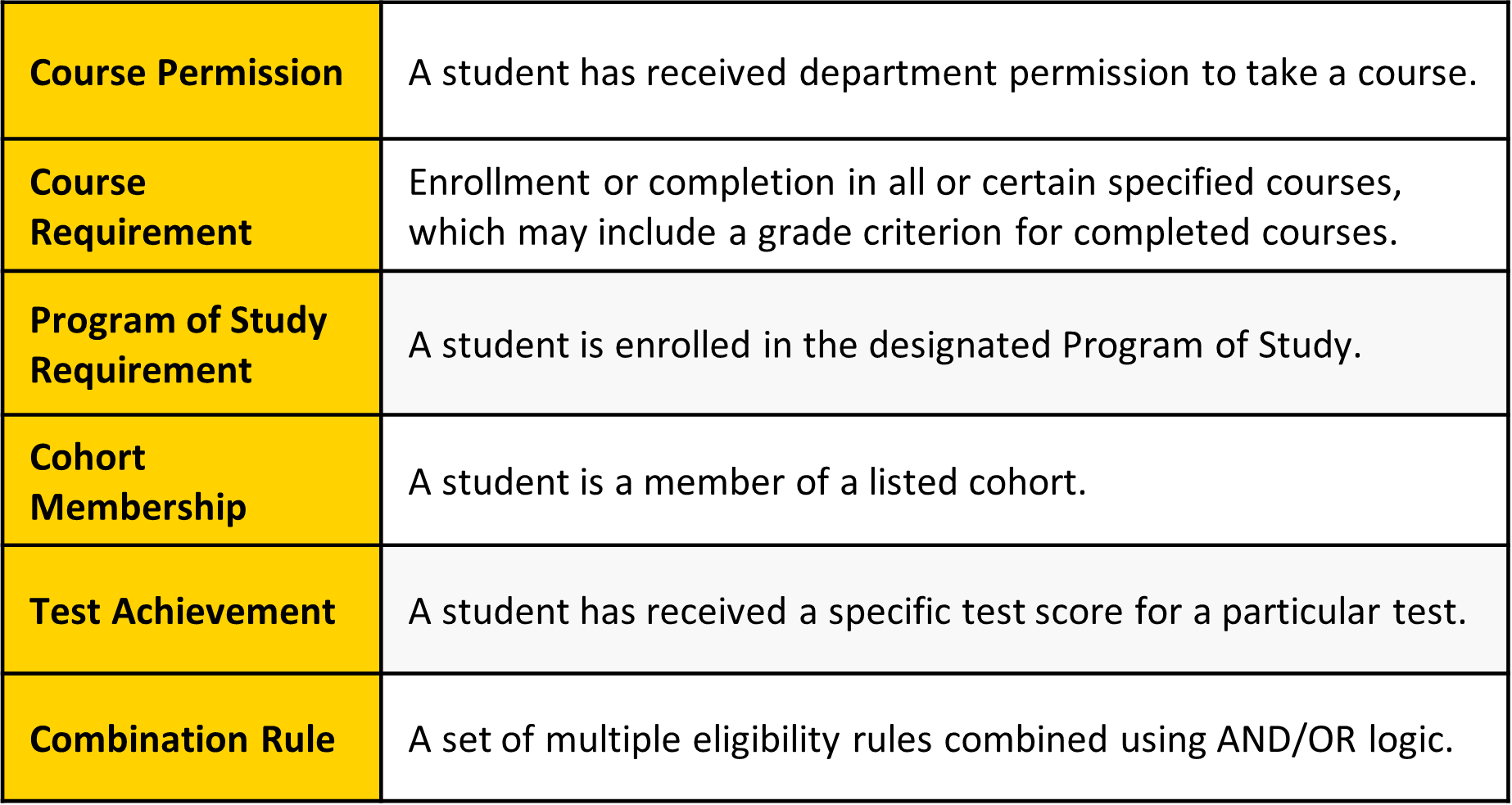
Prerequisite Overrides
If a student does not meet the defined requirements for a course section, the system will not allow them to register for the course section without an approved override. Workday offers a task, Request Course Section Prerequisite Override, that can be, for example, initiated by students and approved or denied by a department or college. Identified department or college approvers will receive a notification in their Workday My Tasks inbox for review where they have the option to approve, deny, or send back for additional details. If they elect to approve the student’s request, the student will receive a notification that they are now eligible to register for the course.
These overrides occur at the section level, meaning that if a student is approved to register, the approval applies only to the specific course section they requested—not to all sections of the course offered in that semester.
The flow of this process might look like:
- Student initiates the Request Course Section Prerequisite Override task.
- The approval request goes to the department or college and the department or college approves.
- After the request is approved, the student is notified.
- The student registers for the course section.
 Please Note: Workday offers student system administrators the ability to monitor unprocessed override requests and alert approvers and students as required.
Example:
Meet Yusuf.
Yusuf would like to register for DANC 207–5501 but has not yet completed the prerequisite of DANC 109, so he comes to a hard stop during registration. He requested a Prerequisite Override to be able to take the course this semester. The approver from the ARHU-Dance department saw his request in their My Tasks inbox in Workday and approved the request. Yusuf is now eligible to register for DANC 207–5501.
Key Takeaways
How are prerequisites enforced?
Prerequisites are enforced through eligibility rules. Students will receive a hard stop if they attempt to register for a course section without meeting the prerequisite or having received a prerequisite override approval.