

Academic Progress Report
Ple ase note: this webpage is intended for learning purposes only and is designed to demonstrate Workday functionality. It does not represent UMD’s final decisions or plans for the Academic Progress Report.
This concept page describes the Academic Progress Report that can be found on a student’s profile in Workday Student.
In Workday Student, the Academic Progress Report serves as the degree audit tool that students and advisors can use to monitor a student’s progress across the programs on their academic record. As a dynamic, real-time resource located on their student profile, the report reflects the most current information available about a student’s progress toward meeting their academic requirements. Academic Requirements are the rules a student must meet to successfully complete their degree objectives, such as the university’s general education requirements or requirements of the major. Learn more about Student Eligibility Rules.
By bringing together program requirements with a student’s completed and in-progress coursework, the Academic Progress Report provides a clear and accessible view of the student’s academic journey.
Academic Progress Report Layout
At the beginning of their Academic Progress Report, students can view a broad overview of their progress, including an Academic Progress Visualization Circle that represents completion of their program requirements.
Below the visual progress wheel(s), Workday displays a Cumulative Grade Point Average (GPA) at the top of the Academic Progress Report.

The Cumulative Grade Point Average is different from the Program of Study Grade Point Average that is calculated in the Academic Progress Report.
Overall Academic Progress
The Overall Academic Progress grid is found at the top of the Academic Progress Report. This grid represents the total number of credits a student needs to complete their degree. Here, students can view the:
- Credits Defined - The number of credits that the degree requires.
- Credits in Progress - The number of credits a student is actively taking that contribute to their overall Credits Defined.
- Credits Satisfying - The number of credits completed that are applicable toward the credits required by the program.
- Remaining - The number of credits a student still needs to complete their degree, including in-progress credits.
- Status - The student’s status toward completing their Overall Academic Progress requirements.
Program of Study Requirements
Each Program of Study (e.g., major, minor, certificate) listed on a student's record is displayed in its own section, which details the student's real-time progress toward fulfilling that program's academic requirements. At the top, students can view:
- Program of Study GPA - The GPA for courses that fulfill a program’s academic requirements.
- Requirements Effective - This represents the catalog year associated with a student’s academic requirements.
- Last Evaluated - The date and time that the Academic Progress Report was last updated to reflect the most current academic progress.
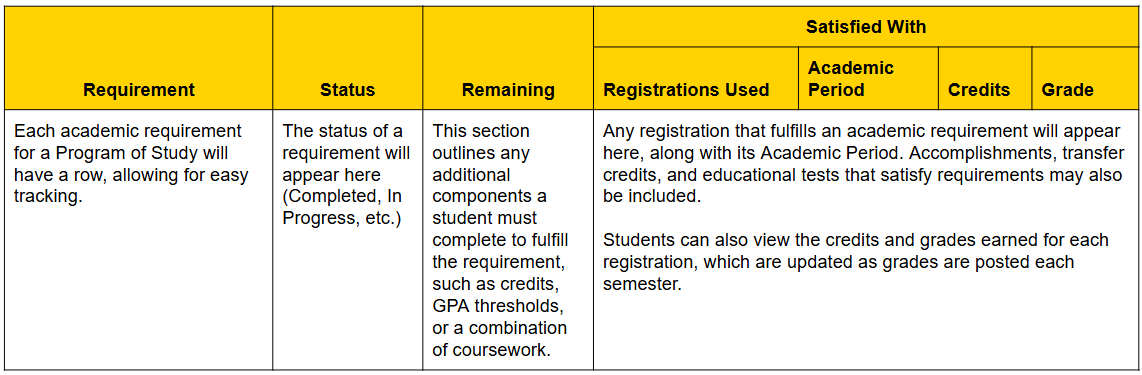
The core feature of each program of study on the Academic Progress Reports is the Requirements grid. This grid details:
Key Takeaways
Does the Academic Progress Report represent the most up-to-date information on my progress toward my degree requirements?
Yes, the Academic Progress Report (APR) is a dynamic tool that updates to reflect your most recent registrations and grades earned toward each of your academic requirements.
Will I have an Academic Progress Report for each program on my record?
Students have one central Academic Progress Report, with different sections for each Program of Study on their Academic Record.
This website will grow over time with workstream information, ideas, and topics, so please continue to revisit! To ask a question or request assistance, please contact elevate@umd.edu.